 FreeSpeech
Technical documentation
For anyone who wants to check how FreeSpeech works, or reimplement it. The full documents are in the code repository, in French and English. For a plain-language explanation, see the How it works page.
The documents
| Document | What it contains |
|---|---|
sources/doc/en/PROTOCOL.en.md | The protocol: identity, contacts, messages, attachments, groups, multi-server, push, WebSocket transport. |
sources/doc/en/ARCHITECTURE.en.md | The parts of the software, how messages are protected, encrypted storage on the device, the database layout, and above all security and its known limits. |
sources/doc/en/INSTALL_RELAY.en.md | Setting up your own server, public or private (Ubuntu guide: ASP.NET Core 10, nginx, automatic start with systemd). |
sources/doc/en/ADMINISTRATION.en.md | Administering a relay or a push gateway without a restart: invitations, bans, sibling servers, logs, tracing. |
sources/doc/en/INSTALL_PUSH.en.md | Installing the push gateway (one key per relay, maintenance, limits). |
sources/doc/en/INSTALL_DIRECTORY.en.md | Setting up a server directory (signed list, reporting of linked servers). |
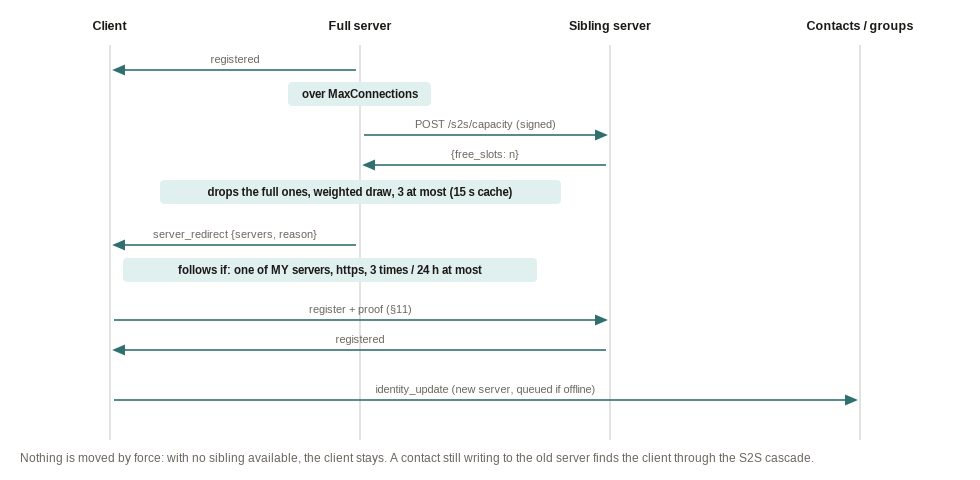
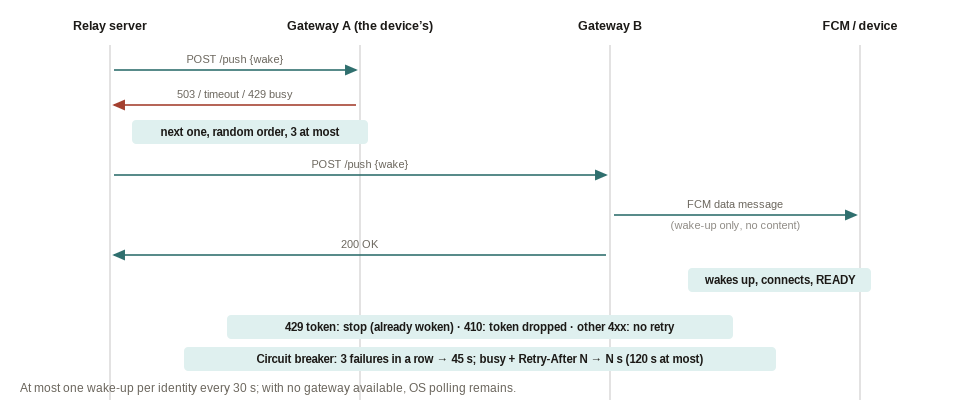
sources/doc/diagrams/ | 14 explanatory diagrams, in French and English. |
Every document exists in French (.md) and in English (.en.md).
How messages are protected, in brief
These technical names will mostly matter to specialists. The last column summarises what each item is for.
| Use | Technique | What it does, in plain words |
|---|---|---|
| Identity (keys made from 3 phrases) | Argon2id (32 MiB, t = 3), then HKDF-SHA256 | Derives your keys from the three phrases, using a deliberately slow calculation to discourage any attempt to guess them. |
| Key of a message | Ephemeral X25519 per message, then HKDF-SHA256 | Generates a brand-new key for every message, which only the sender and the recipient can compute. |
| Encrypting the message | ChaCha20-Poly1305 | Makes the message unreadable to others and detects any change. |
| Signature | Ed25519, tied to the sender, the recipient and the message type | Proves who wrote the message and that it was not altered on the way. |
| Groups | Key shared per period, renewed whenever the members change | One key common to the group, changed as soon as someone joins or leaves. |
| Attached files | 48 KiB pieces, SHA-256 Merkle tree | Lets you check every piece of a received file. |
| Data on the device | SQLite, content encrypted field by field, key derived from the phrases | Your data stays encrypted on your device. |
| Between servers | HMAC-SHA256 signed requests, 120 s window, one-time code | Servers identify themselves to each other, and an intercepted request cannot be replayed later. |
These mechanisms are implemented with the BouncyCastle library (managed code, usable on Android as well as iOS) and verified against fixed test vectors.
What FreeSpeech protects, and what it does not
What is protected
- The content of messages and attachments is end-to-end encrypted and signed; servers never see it.
- The local database, private keys included, is encrypted at rest.
- Removing a member from a group prevents them from reading what follows (key renewal).
- Every piece of a file is checked against a fingerprint that cannot be forged.
- A server cannot pretend to be a user: registration requires proof of possession of the key.
What is not (known limits)
- Metadata: a server sees the sender, the recipient, the timestamps and the connection times. It does not see the content.
- No ratchet: the recipient's long-term key decrypts past traffic if it is stolen. Losing your phrases loses the identity; stealing them steals it.
- “Delete for everyone” and “edit” are best-effort: a modified app can ignore them, and the recipient may have copied the message before.
- Received files are not encrypted by the app. On Android they are in the app's private space, which the system encrypts; on a computer they are ordinary files in the app's data folder.
- Stolen phone: the PIN protects the screen, not the encryption. Remote wipe destroys the copy on the phone but does not delete the identity.
To report a security flaw: contact@rebisway.com.
Hosting your server
A relay is an ASP.NET Core 10 application behind an HTTPS web server (nginx for us; any other will do), on Linux, Windows or macOS. It stores no message. A private relay needs no declaration: give its address in your contact card. A public relay can team up with other public relays by exchanging a shared secret (an allow-list administered by hand). A private relay can also receive only the people it has invited. The step-by-step guide is in sources/doc/en/INSTALL_RELAY.en.md; day-to-day management is in sources/doc/en/ADMINISTRATION.en.md.
Example server address: https://relay.example.org (in the app: Settings → Servers → add).
Licence
FreeSpeech is free software. The code is published under the GNU AGPL v3 or later: you may study, modify and redistribute it under its terms. Since a server is a network service, anyone who runs a modified version must provide its source code to its users. A separate commercial licence is available on request, to embed FreeSpeech in a product that cannot comply with the AGPL: contact@rebisway.com.