 FreeSpeech
How FreeSpeech works
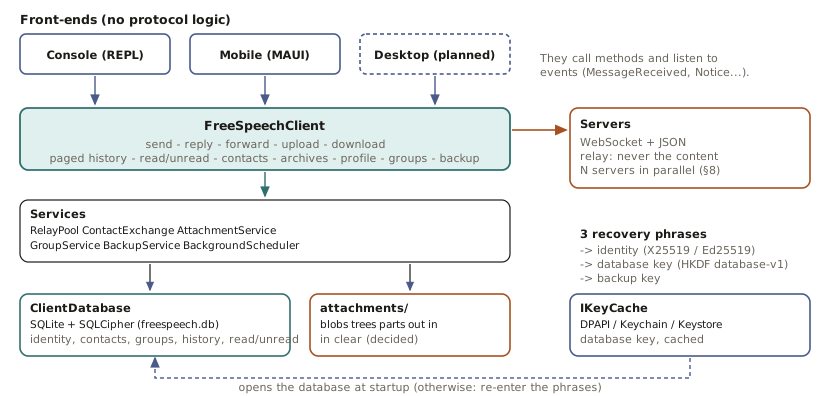
The client does almost everything. The server is a plain relay: it connects two online devices, and it forgets.
1. An identity without an account
When you set up, the app draws three random phrases. From these phrases it computes (Argon2id, then HKDF) one key pair for encryption and one for signing. Your identifier is the fingerprint of your public keys.
- Nothing is sent to a server to "create" the identity: it exists as soon as you hold your phrases.
- Entering the same phrases on another phone gives the same identity: that is how you switch devices or use several.
- The phrases are never stored in the app. Back them up (paper, or a password-protected file): without them there is no recovery.
2. Becoming contacts
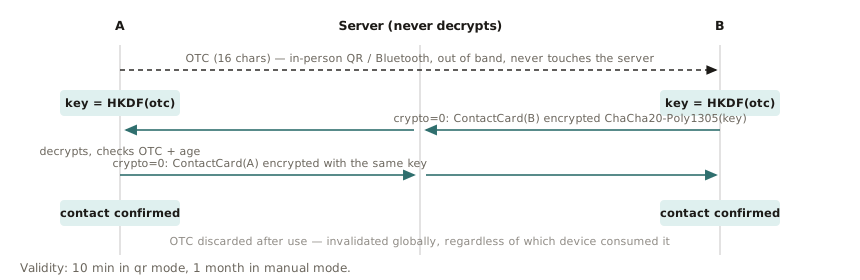
Two people swap a contact card (public keys, nickname, server list) by QR code in person, or as a message copied remotely. The card is protected by a one-time code, valid 10 minutes for a QR and 30 days for a copied card. Afterwards you can compare a safety number, identical on both sides, to make sure nobody slipped into the exchange.
3. Sending a message
- The app signs the message with your key, then encrypts it for the recipient with a fresh ephemeral key for every message.
- It sends it to a server over a WebSocket connection. The server reads the envelope (from whom, to whom) and nothing else.
- If the recipient is connected, the server passes the message on immediately.
- If they are offline, the server keeps nothing. The message stays in your device's outgoing queue, and a notification wakes them. As soon as they reconnect, the message goes out.
- The recipient checks the signature and decrypts.
Notifications never contain the message: they only tell the app to connect and look.
4. Several servers
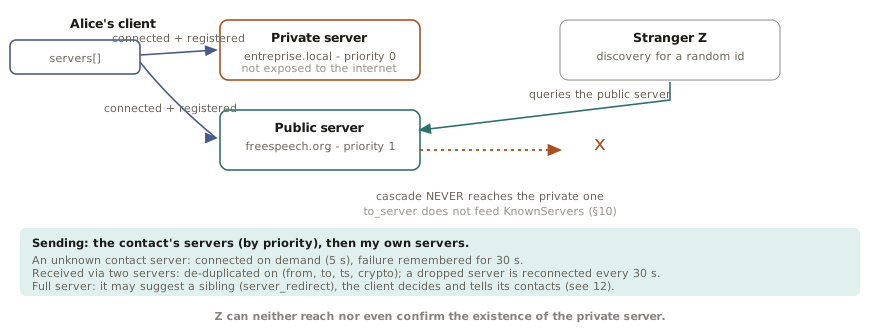
A server is not a central point. Your contact card lists your servers in order of preference; your device connects to all of yours at once and, to send, tries your contact's in order.
- Public servers can recognise each other (allow-list, signed requests) and pass a message along when the recipient is connected elsewhere.
- A private server (company, association, family) appears nowhere else: only those you give your card to know its address.
- If a server goes down, sending goes through another. If a server is overloaded, it can redirect you to a sibling server, and the app then tells your contacts your new address.
5. Groups
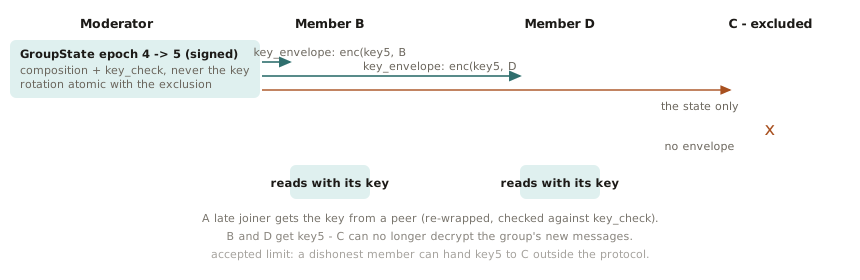
A group shares a key, renewed on every addition, removal or departure: an excluded member cannot read what follows. There is no group server: each message is sent to each member, and an absent member catches up from the other members, even if the author has left. An invitation waits for the invitee's consent.
6. Photos and files
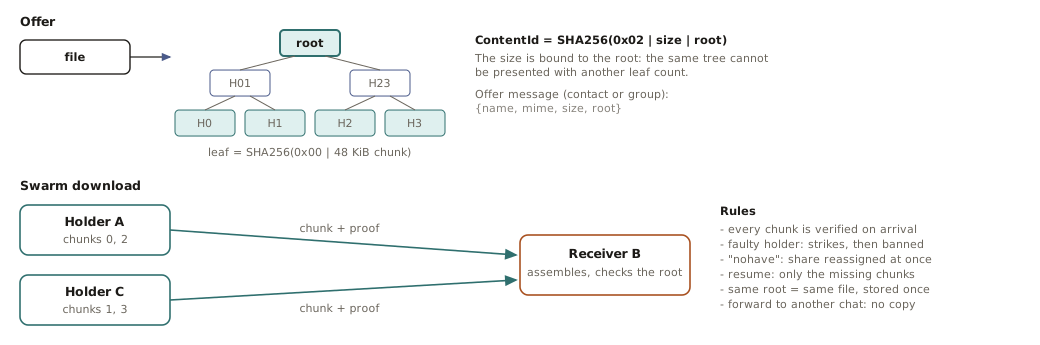
The message only announces that a file exists. The recipient asks for it; it is split into 48 KiB chunks, each with a proof of authenticity (Merkle tree). In a group, any member who already has the file can supply part of it, which relieves the sender. Images are downsized before sending and videos recompressed.
7. Inside the app
All the logic (identity, encryption, servers, groups, files, storage) lives in a library with no user interface; the mobile app only displays. Data sits in an encrypted local database.